.jpg)



How do I download my reconciliation and settlement reports from the Merchant Portal?
Copy link to clipboard

Report Availability
All reports are provided in CSV format and are available at 11 AM UTC Monday-Friday (excluding holidays.)
Note: Funding reports using the EFT rail have an additional Saturday report generated and delivered. Reports are accessible in the merchant portal or from the merchant SFTP (secure file transfer protocol) site.
Additional information about reports is available on the Trustly Developer's site.
Accessing Reports on the Merchant Portal
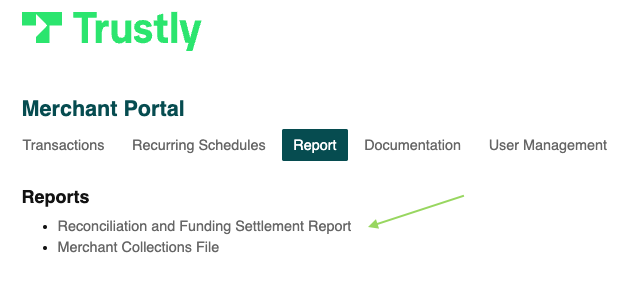
- Navigate to the Report tab in Merchant Portal, and then select Reconciliation and Funding Settlement Report.
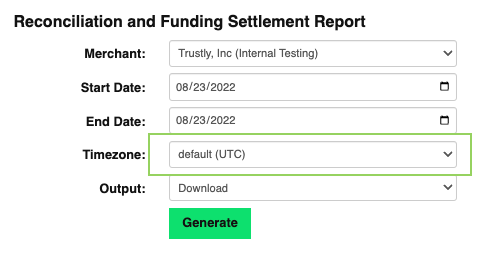
- Select a Start Date and an End Date.
Note: The report period cannot be greater than 31 days due to the size of the files generated.To retrieve transactions or settlements for a specific day, select the following business day.Example: Selecting Start Date: 08/23/2022 and End Date: 08/23/2022 will provide all transactions created between 12 PM on 8/22/2022 and 11:59 AM on 8/23/2022 for the Reconciliation Report and all settlements processed between 12 PM on 8/22/2022 and 11:59 AM on 8/23/2022 for the Funding Report. - Select a Timezone for the report.
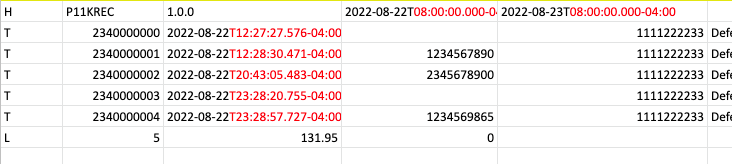
The Timezone option affects only the date and time displayed on the report. It does not determine which transactions are included. Transactions are always retrieved for 12 PM - 11:59 AM UTC for the selected day(s), and then, if you’ve selected a specific time zone, the time is converted from UTC to your selected time zone.
Examples:
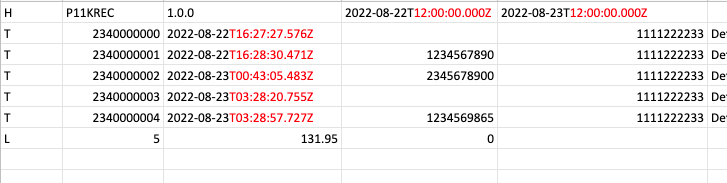
Timezone: default (UTC)
The transactions are shown in UTC time.
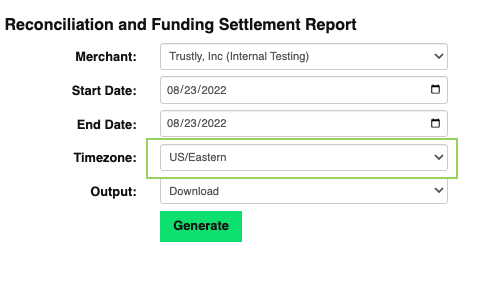
Timezone: US/Eastern
This is the same report showing the same transactions, but the time has been converted to US/Eastern.
- Select an Output for the report.
- The Download option will download a zip file to your computer.
- The SFTP option will generate a zip file on the merchant SFTP.
Thank you! Your submission has been received!
Oops! Something went wrong while submitting the form.

.svg)